
TL;DR

Turn your wind-down time into listening time
- Thousands of audiobooks, podcasts and originals
- Listen on your phone, tablet or Echo — also offline
- Cancel anytime
Building your own AI workstation used to be cheaper, but in 2026, prebuilt options often match or beat DIY prices thanks to bulk buying and shortages. The decision now hinges on your need for speed, control, and support, not just savings.
Ever wondered if you should build your own AI workstation or just buy one ready-made? The answer used to be simple—building was always cheaper, and buying saved time. But today, the game has changed.
With the AI boom pushing prices up for GPUs, RAM, and SSDs, prebuilt systems from top vendors now often cost as much—or less—than a DIY. This isn’t just about saving cash; it’s about balancing cost, speed, and peace of mind in a market that’s more unpredictable than ever.
The real question is: what makes more sense for your workload, your timeline, and your comfort with tech? Let’s break down the tradeoffs so you can make a smart choice in 2026.Build vs buy
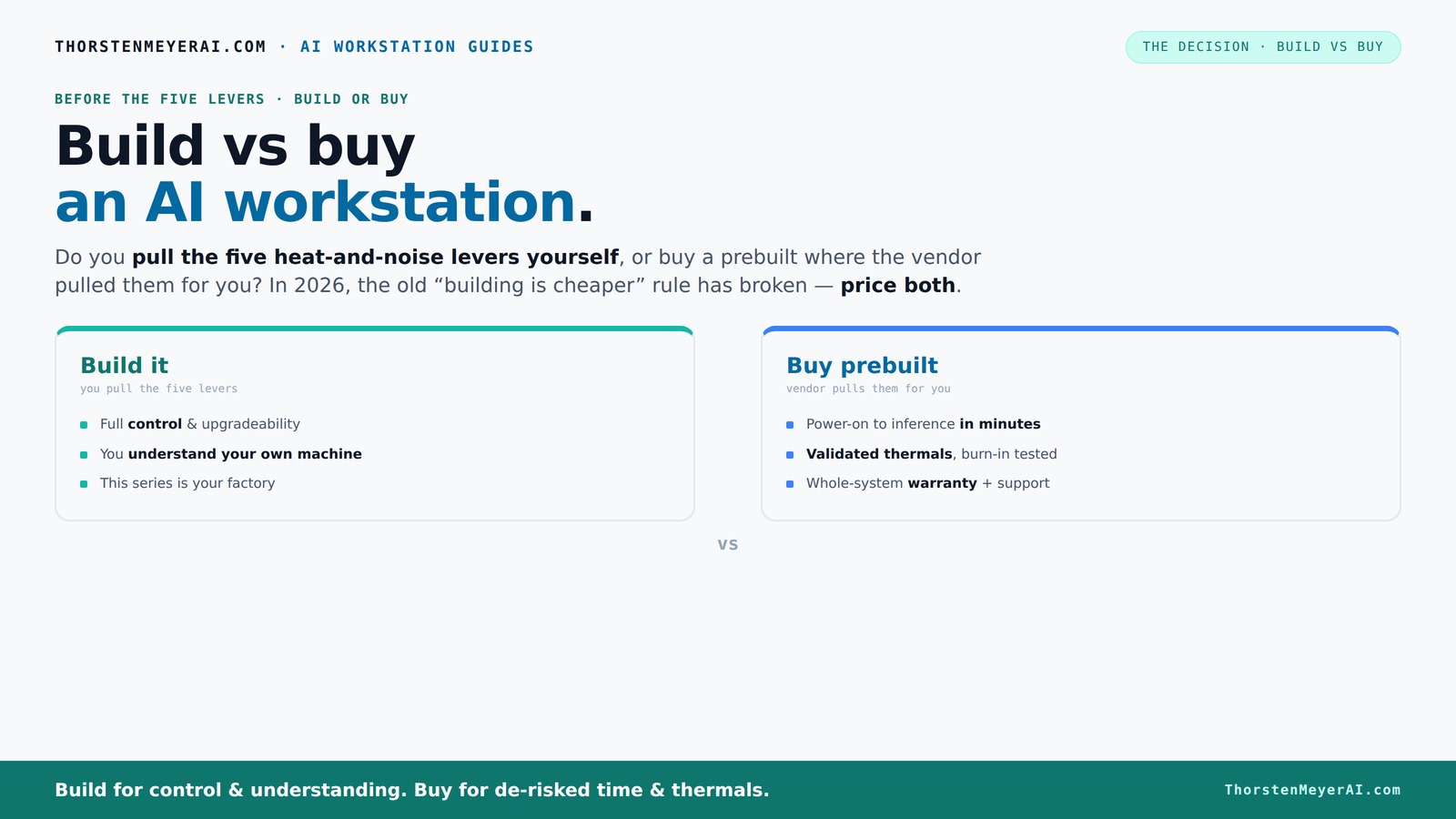
an AI workstation.
The real question behind this whole series: do you pull the five heat-and-noise levers yourself, or buy a prebuilt where the vendor pulled them for you? And in 2026, the old “building is cheaper” rule has broken. Match your situation in Part 3.
Key Takeaways
- Component shortages in 2026 make prebuilt AI workstations often as affordable or cheaper than DIY builds.
- Buying prebuilt reduces setup time and guarantees thermal and stability validation, critical for production workloads.
- DIY provides maximum control over hardware choices and upgrade paths, ideal for highly specialized or evolving needs.
- Support, warranties, and risk mitigation favor prebuilt systems for critical or enterprise use cases.
- Hybrid solutions often strike the best balance, combining quick deployment with tailored upgrades.
As an affiliate, we earn on qualifying purchases.
Why Building a Custom AI Workstation No Longer Always Saves Money
Building used to be a no-brainer for cost-conscious AI enthusiasts. You pick exactly the parts you need, hunt down deals, and often come out ahead. Not anymore.
Today, component prices for GPUs, DDR5 RAM, and SSDs have surged due to shortages and demand spikes. According to market data, a build that cost under $1,000 in 2024 now pushes past $1,250 before even considering an OS or cooling. This increase isn’t just a small bump—it significantly narrows or even reverses the cost advantage of DIY. Meanwhile, prebuilt vendors bought in bulk early, locking in lower prices and passing those savings to you.
This shift means that the traditional advantage of DIY—cost savings—has eroded. Instead, the decision to build hinges more on factors like component availability, your time investment, and how much you value warranty and support. If sourcing parts becomes a prolonged, uncertain process, the time and stress may outweigh the savings, making prebuilt options more attractive.
As an affiliate, we earn on qualifying purchases.
How a Prebuilt AI Workstation Gets You Ready Faster and Safer
Prebuilt AI workstations are like buying a fully tuned race car. They come assembled, tested, and ready to go. You power on, install your AI stack, and start training or inference within hours.
Vendors like Lambda or Puget Systems perform extensive burn-in tests—sometimes 48 hours straight—to ensure the system won’t throttle or overheat under load. These tests are critical because they catch issues that could cause system failures or performance bottlenecks in real-world use. They also tune fans and cooling systems to optimize airflow and noise levels, which is essential for maintaining hardware longevity during intensive workloads. This thorough validation process reduces the risk of unexpected failures, saving you troubleshooting time and potential downtime.
Imagine spending weeks sourcing parts, hoping they’re compatible, then tuning BIOS and cooling just right. That process can introduce delays, compatibility issues, and frustration—especially when stakes are high. A prebuilt system, tested and validated by experts, cuts that down to a day or two, with the added security of a warranty if something goes wrong. This not only accelerates deployment but also provides peace of mind, especially when managing critical AI workloads.
As an affiliate, we earn on qualifying purchases.
The Control and Customization You Sacrifice When Buying
Buying a prebuilt means accepting some limits on hardware choices. You might not find the exact GPU, RAM capacity, or cooling setup you want. For highly specialized workloads, this can be a dealbreaker because it restricts your ability to tailor the system precisely to your needs.
For example, if your AI tasks require multiple high-end GPUs, such as four RTX 4090s, most prebuilt options won’t offer that configuration out of the box. Custom cooling loops or specialized power supplies are often unavailable or require additional modifications. This means you’re trading the flexibility of full hardware control for the convenience of a ready-to-run system. Such tradeoffs are especially relevant for research labs or enterprise setups where specific hardware configurations are crucial for performance and efficiency.
On the other hand, if your workload is more standard—training common models, running inference, or data processing—many vendors now provide highly optimized, validated systems that meet these needs without the need for extensive customization. The key is understanding whether your workload demands bespoke hardware or if a preconfigured system can deliver the performance you need.
As an affiliate, we earn on qualifying purchases.
Performance, Support, and Risk: Which Option Protects Your Work?
If uptime and reliability matter—say you’re running a production model—prebuilt systems often come with a warranty and dedicated support. These systems are tested for thermal performance and stability, reducing the likelihood of failures during critical operations. Support teams can help troubleshoot issues quickly, minimizing downtime and data loss.
In contrast, building your own system means you’re responsible for all troubleshooting, part replacements, and warranty claims. If something breaks—say, a faulty GPU or cooling failure—you must diagnose the problem, order replacements, and handle installation yourself. For mission-critical workloads, this can lead to costly delays and increased stress, especially if you lack the necessary expertise.
For example, a NVIDIA A100 GPU in a prebuilt might be validated for continuous operation, with vendor support ready to help if something fails, ensuring minimal disruption. DIY setups require you to ensure cooling, power delivery, and compatibility are all properly managed, which can be complex and time-consuming. Therefore, support and risk mitigation are significant factors favoring prebuilt systems for enterprise or production environments.
Upgrading and Future-Proofing: Who Has the Edge?
Building your own system offers the most flexibility for future upgrades. You can swap out GPUs, add more RAM, or expand storage as your needs evolve, provided your case and power supply support these changes. This adaptability is critical if you anticipate scaling your AI models or incorporating new hardware standards.
Prebuilt systems, however, often lock you into specific configurations. Proprietary parts, limited PCIe slots, or integrated cooling solutions can restrict upgrade options. Upgrading a GPU may involve sending the entire system back to the manufacturer or paying a premium for proprietary components, which reduces the flexibility and can delay future expansion.
For example, if you plan to scale your AI training by adding more GPUs in a year, a custom build with open PCIe slots, modular power supplies, and standard components provides a straightforward upgrade path. Prebuilt systems designed for specific configurations may require more complex upgrades or complete replacements, making future-proofing more challenging and costly.
When Does a Hybrid Approach Make Sense?
The smartest move in 2026? Combine the best of both worlds. Buy a solid, pretested core system, then customize key components to suit your specific needs.
For instance, you could purchase a prebuilt system with the CPU, motherboard, and basic cooling, then upgrade the GPU or add specialized storage to optimize performance for your workload. This approach allows you to deploy quickly while maintaining control over critical hardware upgrades, balancing speed, cost, and customization.
Many vendors now offer customizable configurations, enabling AI professionals to select core components and then tailor specific parts, such as high-end GPUs or additional storage. This hybrid strategy minimizes the time and complexity of a full DIY build while still giving you the flexibility to adapt hardware over time, making it an attractive option for evolving AI projects.
Decision Checklist: Which Path Fits Your Needs?
- Do you need a system immediately, or can you wait 4–8 weeks?
- Is your workload highly specialized or fairly standard?
- How much technical expertise and time do you have?
- Is maximum upgradeability critical for your project?
- Are you comfortable troubleshooting hardware and BIOS issues?
- Does your budget include support and warranty costs?
Common Pitfalls When Choosing Between Build and Buy
Many jump into building, assuming it’s cheaper, only to get caught in component shortages or spend extra time tuning. Overlooking support and warranty can turn a DIY project into a costly headache.
Conversely, buying without verifying specs or future upgrade plans might leave you with a system that doesn’t grow with your needs. Not understanding the limitations of prebuilt configurations can result in costly upgrades or replacements down the line.
For example, buying a prebuilt with limited PCIe slots might hinder future GPU scaling, reducing your ability to expand performance. Or, building your own with incompatible cooling could cause overheating, leading to hardware failures and downtime. Recognizing these pitfalls helps you plan more effectively and avoid costly mistakes later.
Frequently Asked Questions
Is a prebuilt AI workstation worth it?
Yes, especially if you need to start quickly, want validated thermal performance, and prefer support. For most professionals, the time saved and reduced risk outweigh the higher initial cost.Is it cheaper to build or buy an AI workstation over 3 years?
It depends on your ability to source parts at good prices and your upgrade plans. In 2026, prebuilt systems often match or beat DIY costs over three years due to market conditions and bulk buying.Can a prebuilt workstation be upgraded later?
Yes, but with limits. Many prebuilt systems offer some expansion options, like additional RAM slots or PCIe slots, but upgrading GPUs or cooling might require sending the system back or replacing major components.How do I compare GPU, VRAM, RAM, storage, and cooling requirements?
Focus on your workload’s demands: large language models need more VRAM, while data-heavy tasks benefit from faster storage. Use detailed specs and vendor validation reports to match your needs effectively.Conclusion
Deciding whether to build or buy your AI workstation in 2026 isn’t just about costs anymore. It’s about what you value—speed, control, support, or future-proofing. The market now rewards smarter choices that balance these factors.
Remember, your ideal setup depends on your workload, timeline, and expertise. But in a market where component shortages can level prices, choosing the right path could be the difference between a bottleneck and a breakthrough.
Halloween Picks
halloween
As an affiliate, we earn on qualifying purchases.